
How to Withdraw PF EPFO Online 2026 Step by Step Guide
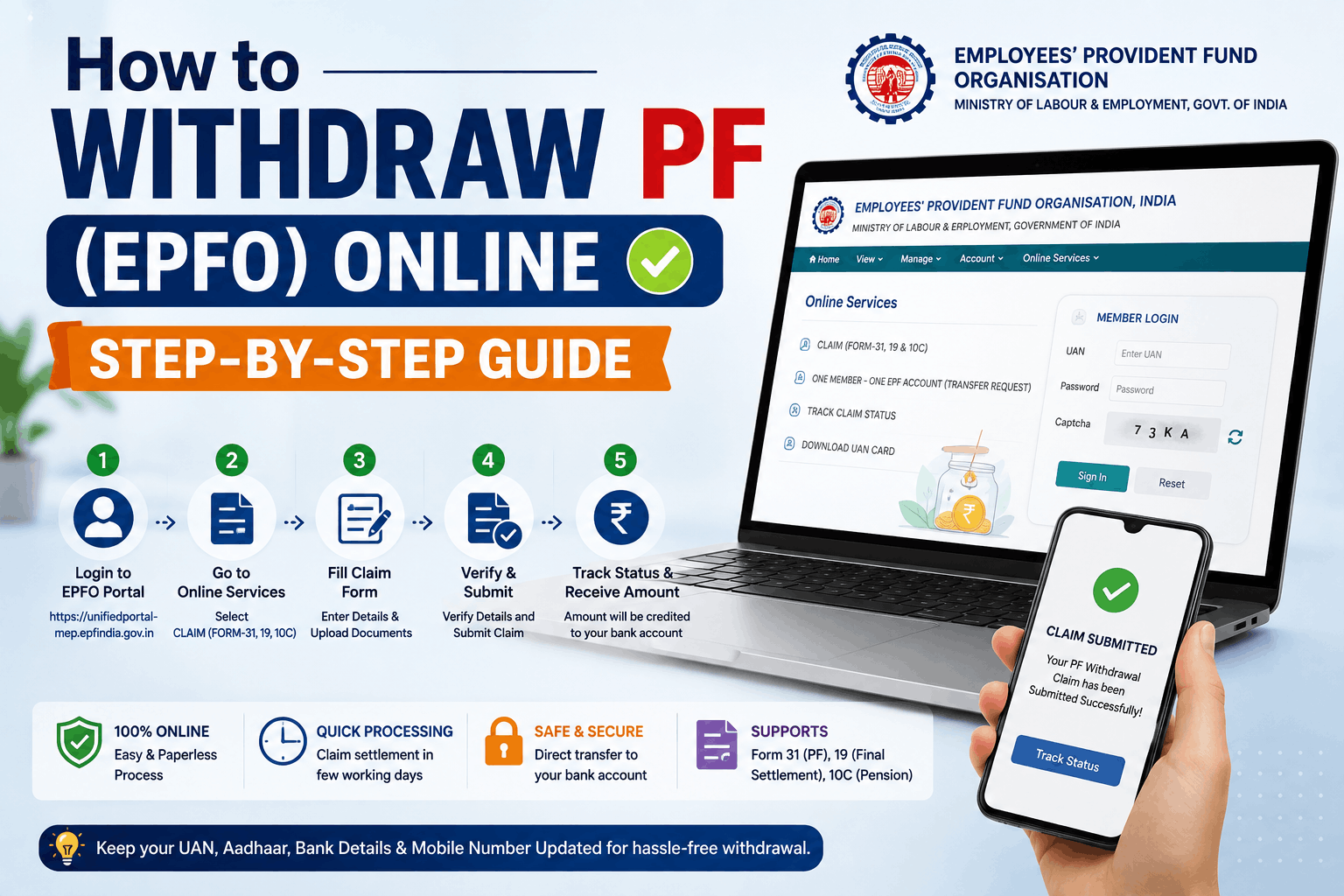
Quick answer: To withdraw your PF online, log in to the EPFO Unified Member Portal at unifiedportal-mem.epfindia.gov.in using your UAN and password, confirm your KYC (Aadhaar, PAN, and bank details) is verified under Manage → KYC, then go to Online Services → Claim (Form-31, 19, 10C & 10D), verify your bank account, select the correct claim type, and submit using Aadhaar OTP. Most claims are processed within 3-15 working days, and PF advances up to ₹1 lakh for illness, marriage, or education can now be auto-settled within 72 hours if your KYC is fully verified.
Withdrawing your Employees' Provident Fund (EPF) used to mean paperwork, employer signatures, and trips to a regional PF office. In 2026, the entire process can be completed online in most cases, without needing your employer's attestation, provided your UAN is properly linked to Aadhaar and your KYC details are verified. This guide walks through the full step-by-step process, which form to use for your specific situation, processing timelines, tax rules, and how to avoid the most common reasons claims get rejected. This article is for general informational purposes — EPFO rules and portal steps can change, so always cross-check current requirements on the official EPFO website before filing a claim.
Before You Start — Requirements for Online PF Withdrawal
Before attempting an online claim, make sure the following are already in place — most claim rejections happen because one of these isn't fully set up:
- Activated UAN: Your Universal Account Number must be activated on the EPFO member portal.
- KYC verification completed: Aadhaar, PAN, and your bank account with IFSC code must all be linked and show as "Digitally Approved" under the KYC section.
- Aadhaar-linked mobile number: Required for OTP-based authentication when you submit your claim.
- Updated Date of Exit: If you've left your job, your former employer needs to have recorded your exit date in your service history — this can be checked under View → Service History. If your employer hasn't updated it, this is a common cause of delay.
- NPCI-linked bank account (optional but helpful): If your bank account is already NPCI-verified and linked to your UAN, the portal skips the document upload step for a cancelled cheque or passbook image entirely.
Step-by-Step: How to Withdraw PF Online via the UAN Portal
- Log in to the UAN Member Portal. Visit unifiedportal-mem.epfindia.gov.in, and log in with your UAN, password, and the captcha shown.
- Verify your KYC status. Go to Manage → KYC and confirm your Aadhaar, PAN, and bank account all show as "Digitally Approved." If anything is missing or unverified, fix this before proceeding — it will block your claim otherwise.
- Go to Online Claims. Click Online Services in the top menu, then select Claim (Form-31, 19, 10C & 10D).
- Verify your bank account. Enter the last four digits of your registered bank account number, then click Verify, followed by Proceed for Online Claim.
- Select the type of claim. From the dropdown under "I want to apply for," choose the option that matches your situation — PF Advance (Form 31) if you're still employed, Only PF Withdrawal (Form 19) if you've left your job, or Only Pension Withdrawal (Form 10C) for the pension component. More detail on choosing the right one is below.
- Fill in the required details. Provide your reason for withdrawal, current address, and — under EPFO 3.0 — your preferred payment method (bank transfer or UPI).
- Sign the Certificate of Undertaking when prompted, confirming the details you've submitted are accurate.
- Verify with Aadhaar OTP. Tick the disclaimer checkbox, enter the OTP sent to your Aadhaar-linked mobile number, and click Submit.
- Track your claim status. Once submitted, you can track progress under Online Services → Track Claim Status. Once EPFO verifies your claim, the amount is transferred directly to your registered bank account.
How to Withdraw PF via the UMANG App
If you'd rather use your phone instead of the web portal, the UMANG app offers the same claim process:
- Open the UMANG app and log in with your registered mobile number.
- Search for and select "EPFO" under available services.
- Tap "Raise Claim" under employee-centric services.
- Enter your UAN and verify with the OTP sent to your Aadhaar-linked mobile number.
- Select your claim type and amount (for Form 31), then submit using Aadhaar OTP verification, the same as on the web portal.
Which Form Should You Use? Form 19 vs Form 31 vs Form 10C
Choosing the correct form matters — applying with the wrong one is one of the most common reasons claims get rejected or delayed.
| Form | Use When | Note |
|---|---|---|
| Form 19 | Full and final EPF settlement after leaving a job (resignation, retirement, or job loss) | Closes your EPF account permanently — no further contributions or interest after settlement |
| Form 31 | Partial advance while still employed, for approved reasons like medical treatment, education, marriage, or home purchase | Claims up to ₹1 lakh for illness, marriage, or education can be auto-settled within 72 hours if KYC is fully verified |
| Form 10C | Withdrawing the pension (EPS) component after leaving a job, if total service is under 10 years | Not applicable if your PF service is less than 6 months — only the PF amount can be claimed via Form 19 in that case |
EPFO has also introduced a Composite Claims Form in recent years that consolidates these options, and as of 2026, the previous 13+ specific reasons for a Form 31 advance have reportedly been simplified into 3 broader categories, which EPFO states has meaningfully reduced claim rejection rates.
Transfer vs Withdrawal — Think Before You Withdraw on a Job Change
If you're switching jobs rather than leaving the workforce, transferring your PF balance to your new employer's account is usually the better option instead of withdrawing it. Transferring preserves your continuous service record, which matters for two reasons: withdrawals from an EPF account held for less than 5 years of continuous service are taxable, while withdrawals after 5+ years of continuous service are generally tax-free, and 10 years of continuous service is also the threshold that unlocks EPS pension eligibility. Withdrawing and re-starting a new account each time you switch jobs can quietly reset this clock. To transfer, your new employer opens a PF account linked to the same UAN, and you can request the transfer online through the EPFO portal's "PF Transfer" option — typically completed within 2-5 working days.
Eligibility — When Can You Withdraw Your Full PF?
For a full and final settlement (Form 19), the long-standing rule has required an employee to remain unemployed for a minimum period after leaving their last job before the full amount can be claimed. Note: some 2026 sources reference an updated EPF Scheme with a revised unemployment waiting period — reported figures vary between sources, so this is one detail you should specifically confirm on the official EPFO portal or with your regional EPFO office before filing, since applying with an incorrect assumption here is a common cause of claim rejection.
How Long Does PF Withdrawal Take?
| Claim Type | Typical Processing Time |
|---|---|
| Form 31 (Advance) — auto-settlement eligible | Within 72 hours |
| Form 31 (Advance) — standard processing | 3-7 working days |
| Form 19 + Form 10C (Full Settlement) | 5-20 working days, depending on KYC verification status |
| PF Transfer (job change) | 2-5 working days |
Fully KYC-verified accounts with a correctly updated exit date consistently process faster than accounts with any pending verification — the preparation step matters more than almost anything else for a smooth, fast withdrawal.
Tax Rules on PF Withdrawal
- PF withdrawals after 5 or more years of continuous service are generally tax-free.
- Withdrawals before completing 5 years of continuous service are generally taxable, with TDS (Tax Deducted at Source) applicable above certain thresholds.
- If your PAN is not linked to your UAN, TDS is deducted at a significantly higher rate of 30%, regardless of your income tax slab — linking PAN before filing a claim is a simple step that can meaningfully affect how much you actually receive.
- Tax rules can have specific exceptions and thresholds that change from year to year — for a withdrawal involving a significant amount, it's worth confirming current tax treatment with a tax professional or the official EPFO/Income Tax Department guidance rather than relying solely on this summary.
Common Reasons PF Claims Get Rejected — And How to Avoid Them
- Name mismatch: Your name in the EPFO database doesn't match your Aadhaar or bank records exactly. Fix this by submitting a Joint Declaration Form before filing your claim.
- Unclear cheque or passbook image: If your bank account isn't NPCI-verified, you'll need to upload a scanned cheque or passbook page — make sure your name, account number, and IFSC code are clearly legible in the image.
- Wrong form selected: Choosing Form 31 (Advance) but selecting an "out of service" reason, or a similar mismatch between form and situation, causes automatic rejection.
- Claim settled but returned: The payment was processed but bounced because the linked bank account is dormant, frozen, or the IFSC code was incorrect — double-check your bank details are current before submitting.
- Missing exit date: If your former employer hasn't updated your Date of Exit in the EPFO system, your Form 19 claim can't be processed until this is corrected — you may need to follow up with your employer directly.
Frequently Asked Questions
Can I withdraw my PF online without my employer's approval?
Yes — if your UAN is Aadhaar-linked and your KYC is fully verified, employer attestation is generally no longer required for online claims, including Form 19. Your employer's only remaining role is updating your Date of Exit in the system before you left.
How do I check my PF claim status?
Log in to the EPFO Unified Member Portal, go to Online Services, and select Track Claim Status to see the current stage of your submitted claim.
What is the difference between Form 19 and Form 31?
Form 19 is for a full and final PF settlement after leaving a job, permanently closing the account. Form 31 is for a partial advance withdrawal while you're still employed, for approved reasons like medical emergencies, education, or a home purchase.
Is PF withdrawal taxable?
Withdrawals after 5+ years of continuous service are generally tax-free. Withdrawals before completing 5 years of continuous service are generally taxable, and TDS is deducted at 30% if your PAN isn't linked to your UAN, regardless of your applicable slab rate.
Should I withdraw my PF or transfer it when I change jobs?
Transferring is usually the better choice if you're continuing to work. It preserves your continuous service record, which affects both the tax-free threshold (5 years) and EPS pension eligibility (10 years) — withdrawing and restarting can reset this progress.
How long does it take to receive PF withdrawal money?
Auto-settled advances (up to ₹1 lakh for illness, marriage, or education with verified KYC) can be processed within 72 hours. Standard advance claims typically take 3-7 working days, and full settlements typically take 5-20 working days depending on KYC verification status.
What documents do I need for online PF withdrawal?
In most cases, no physical documents are needed if your Aadhaar, PAN, and bank account are already digitally verified on the EPFO portal. If your bank account isn't NPCI-verified, you may need to upload a scanned cancelled cheque or passbook page showing your account number and IFSC code clearly.
Disclaimer: This article is intended for general informational purposes only and does not constitute financial, tax, or legal advice. EPFO rules, forms, and portal steps are periodically updated — always verify current requirements on the official EPFO website (epfindia.gov.in) or consult a qualified professional before filing a claim, especially regarding eligibility timelines and tax treatment specific to your situation.
Last updated: 11 August 2026.
By : ravi
By : ravi
By : ravi
By : ravi
By : ravi
By : ravi
By : ravi
By : ravi
By : ravi
By : ravi